3D Text Studio has a built in animation engine. These are not just basic animations. you can create diverse and complex animations, random or ordered.
Here are the main features
- Visual editor –
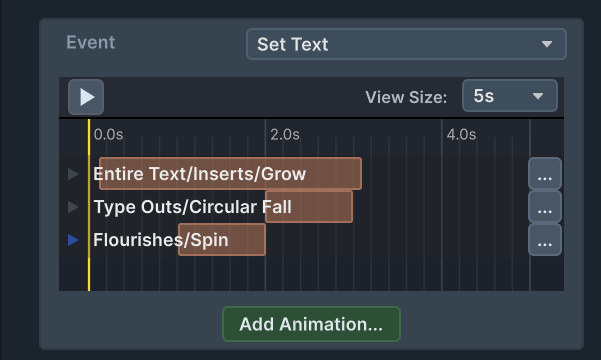
- Timeline Ruler – control the start and end of the animations using drag gestures in the insepctor
- no code – compose animations in the unity inspector
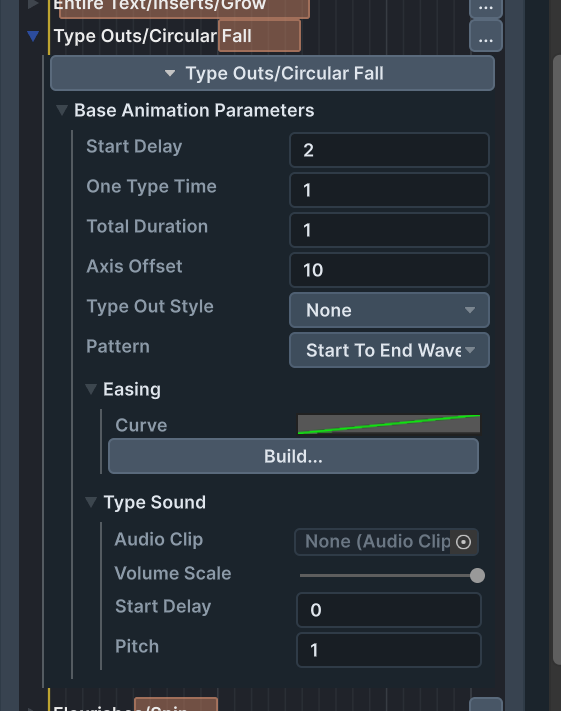
- Parametrized animation blocks – use the premade animation blocks to create complex and stunning animations. control directions , angles , animation time and more.
- Animations can be random or ordered – Random animations can look more alive then a premade animation. and ordered animations can be created without hassle.
- Animation blending – you can play multiple animations at the same time.
- Animation easing – Each animation can be fine tuned using an easing curve. The curve is completely customizable. you can create effects such as elastic jumps , bounces , shivers and more . The asset comes with a collection of ready made easing functions for your to use.
- Play sounds – the engine pools Audio Source objects and allows you to play Audio clips and control volume and pitch
- Hold Animations – animations that start playing and continue until they are released. This is great for pointer hover interactions and similar use cases
- Layout Animations – Animate the insertion of new letters , the removal of letters , newlines and more.
- Animation block library – a rich extensive library of parametrized premade animation block, that can be combined into stunning animations
Timeline Ruler:
Animation Parameters: