Once you understand how the Timeline Ruler works. you can animate interactions. these are special animations that hold their position until they are released. for example , when the user hovers the mouse over a Text3D object, you can make the text grow until the mouse leaves the area of the Text3D object.
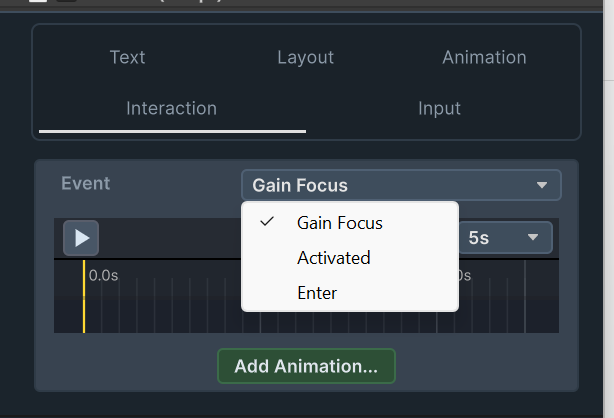
Interaction events can be edited under the Interaction tab of the Text3D component inspector. These are the events:
Gain Focus – This animation event starts when Text3D.GainFocus() is called. Calling GainFocus makes the text receive input from the keyboard. this animation lasts until Text3D.LooseFocus() is called, or until the Text3D object looses focus from some other reason (such as user pressing esc , another object receives focus ,etc.) you may want to take a look at this folder Extras/Tutorial Scenes/3. Text Input
            if(!inputText.IsFocused)
            {
                Debug.Log("focused");
                inputText.GainFocus(); // call this to start typing
            }
            else
            {
                Debug.Log("lost focus");
                inputText.LooseFocus(); // call this to end typing
            }
Enter – This animation event starts when Text3D.Enter is called, and stops when Text3D.Leave is called. you can use this for mouse hover , or for any other purpose that you see fit.
Activate – this animation event starts when Text3D.Activate is called, and stops when Text3D.Deactivate is called. you can use this for any purpose you see fit.
to learn more about interactions , and specifically the Enter and Activate events, you may want to look at this folder Extras/Tutorial Scenes/5. Hold Interactions
        public void ActivateDeactivate()
        {
            //in this example we can blend an animation based on a script interaction.
            //this animation is blended togather with other animations and is not dependant on them

            if (!isActive)
            {
                isActive = true;
                interactiveText.Activate(); // this starts the perpetual animation defined in the inspector (under interactions/activate)

            }
            else
            {
                isActive = false;
                interactiveText.Deactivate();// this ends the animation defined in the inspector (under interactions/activate)

            }
        }

        public void EnterLeave()
        {
            //in this example we can blend an animation based on a script interaction.
            //this animation is blended togather with other animations and is not dependant on them

            if (!isEntered)
            {
                isEntered = true;
                interactiveText.Enter(); // this starts the perpetual animation defined in the inspector (under interactions/enter)

            }
            else
            {
                isEntered = false;
                interactiveText.Leave();// this ends the animation defined in the inspector (under interactions/enter)

            }
        }