Events fall into 3 categories : “Animation” , “Interaction” and “input”.
You can find them in 3D Text Object Inspector tabs. each has it’s own function.
Animation
Event types
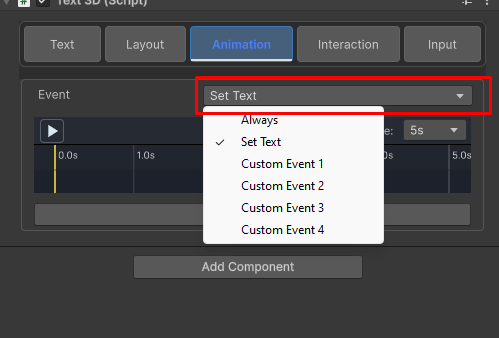
Set Text- Played on text startup or when set text is called from script
Always – this animation is blended with all other animation and is played all the time.
Custom Event 1-4 – these events are blended when Text3D.PlayCustomEventAnimation is called from script. to learn more see Basics/Tutorials/CustomEvents .
Interaction
interactions can be used to animated mouse hover, mouse click ,gain/loose focus etc.
Gain Focus- Starts playing when GainFocus is called on the underlaying text3d object and stops when focus is lost. for more information about focus events see this page
Activate – Starts playing when Activate is called on the underlaying text3d object. stops playing when Deactivate is called.
Enter – Starts playing when Enter is called on the underlaying text3d object. stops when Leave is called.
To see a simple example of how interactions are used , have a look at Basics/Tutorials/Hold Interactions
To see a real use case , see Basics/Tutorials/Menu
Input
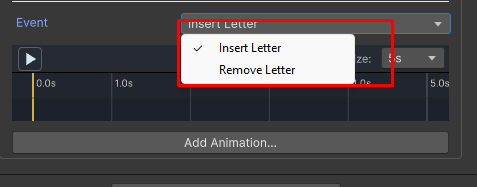
input events are played when adding or removing a letter from the text during keyboard input.