Keyboard input is supported out of the box for all supported languages. The only limitation being IME not supported on WebGL.
first create a 3d text object
You may also want to look at Basics/Tutorials/Text Input
Go To the text object inspector and select the input tab
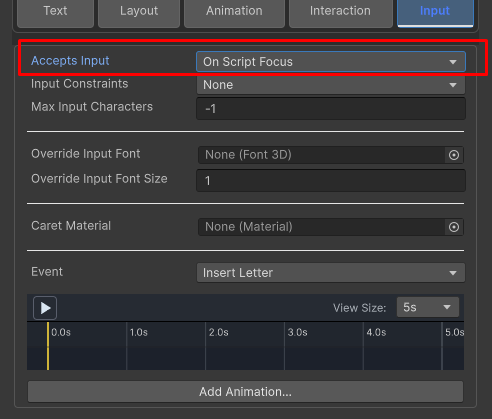
change “Accepts Input” to on script focus.
You may want to set sepcific input settings
Input constraints – Sets the allowed characters in to input.
Max Input characters – the maximum amount of characters allowed. or -1 for no limitation
Override Input Font – if set , the input’s font will be the override font. otherwise it is inherited from the text near it
Caret Material – if set , the material for the text input caret
Insert Letter/Remove Letter animations – learn more about animations from the animation sections and articles
Gain/Loose Focus through script
To start typing you must first call gain focus on the text3d object. this can be done like so:
inputText = GetComponent<Text3D>(); //or obtain it in another way
inputText.GainFocus();
You can trigger focus on mouse clicks, button clicks or any other event you’de like.
Once the user is done typing you can loose focus like so:
inputText.LooseFocus();Handling input events
you can handle input events by hooking the onTextChanged event of the Text3D object:
        public void Start()
        {
            inputText.onTextChanged -= TextChanged;// remove the event in case start was called more then one time
            inputText.onTextChanged += TextChanged; // hook the text change event
        }

        private void TextChanged(Text3D obj, string text)
        {
            Debug.Log($"Text Changed:\"{text}\"");
        }
you can also call GetText at any time to recive the current text being displayed in the Text3D Object
string myText = inputText.GetText();Animating input
Select the “Insert Letter” event
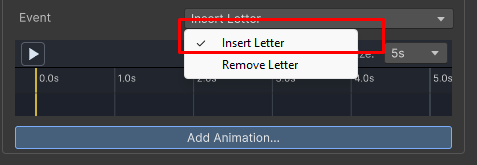
now add a grow animation
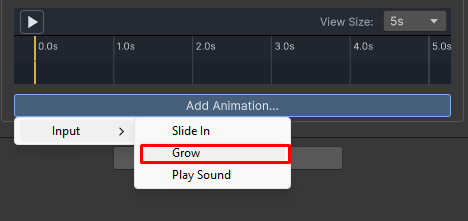
this will make letters grow every time a letter is inserted. similarly you can choose a shrink animation for the “remoev letter” event.
note that it is best to keep the input animations short , otherwise there may be a lag in the input flow
Learn more about input
You may also want to look at Basics/Tutorials/Text Input